EliteTeQ Inbox

One WhatsApp number.Your whole team answering.The WhatsApp team inbox and CRM for businesses

Every customer message from WhatsApp, Facebook and Instagram in one list, with a clear owner and a next step.

EliteTeQ Inbox is a shared inbox and lead pipeline built on the official WhatsApp Business Platform. Your staff answer from their own logins on a computer or phone, you see who replied to whom, and no customer waits because the business phone was in someone else’s pocket.

7 days free · no card needed · your whole team

WhatsApp or call +1 214 423 5355 · a person replies, usually in under 10 minutes

  • WhatsApp, Messenger, Instagram DMs and comments in one place
  • Keep using the WhatsApp Business app on your phone
  • Lead pipeline with hot leads flagged for you
  • 7-day free trial with every feature open
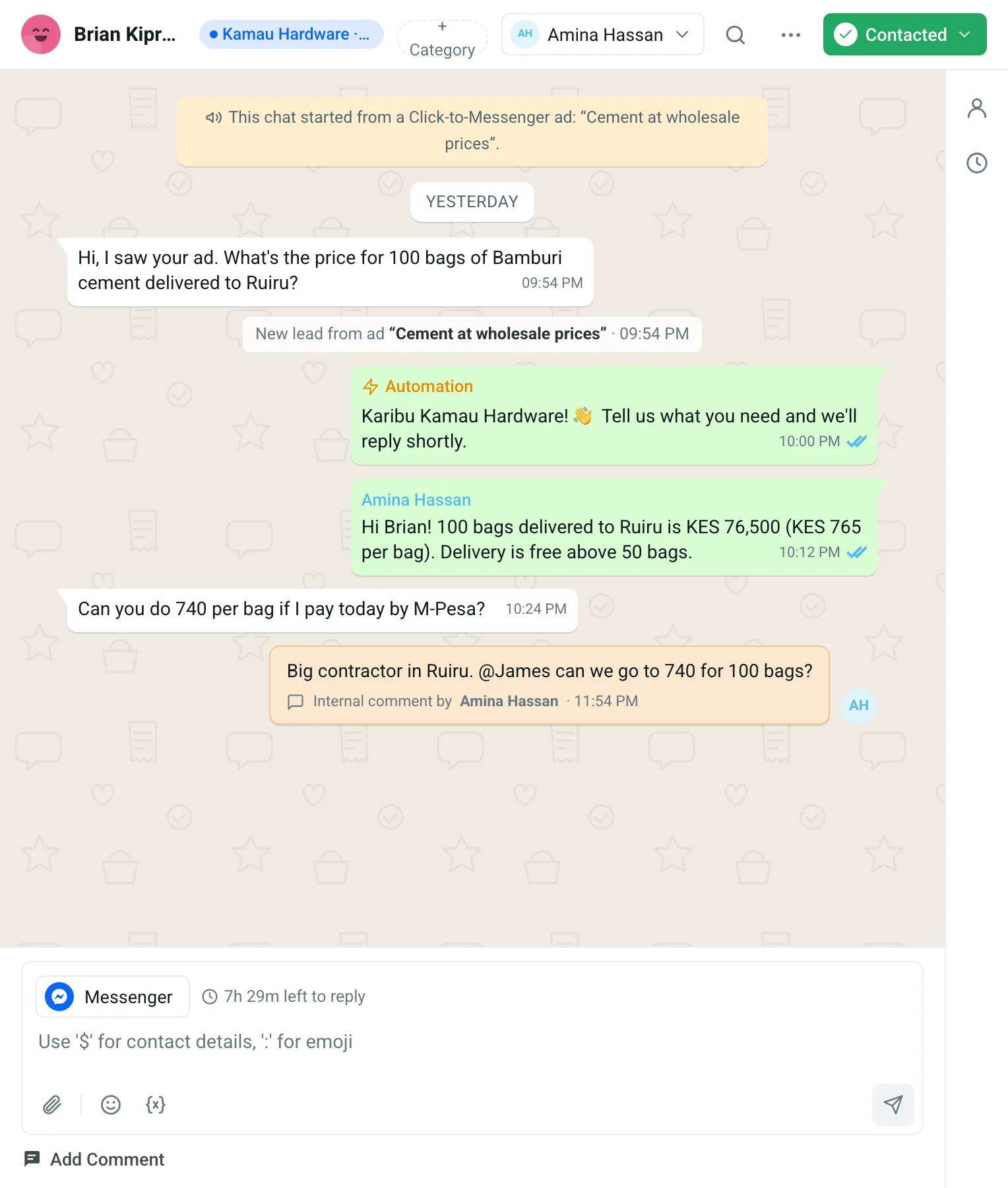
EliteTeQ Inbox chat screen: a list of customer chats with hot-lead flames and ad tags, and an open Messenger chat that started from an ad, with an automatic greeting, a staff reply, an internal comment and the reply-window timer
  1. The ad this customer tapped
  2. Hot lead, waiting for you
  3. Internal comment, never sent
  4. Time left to reply
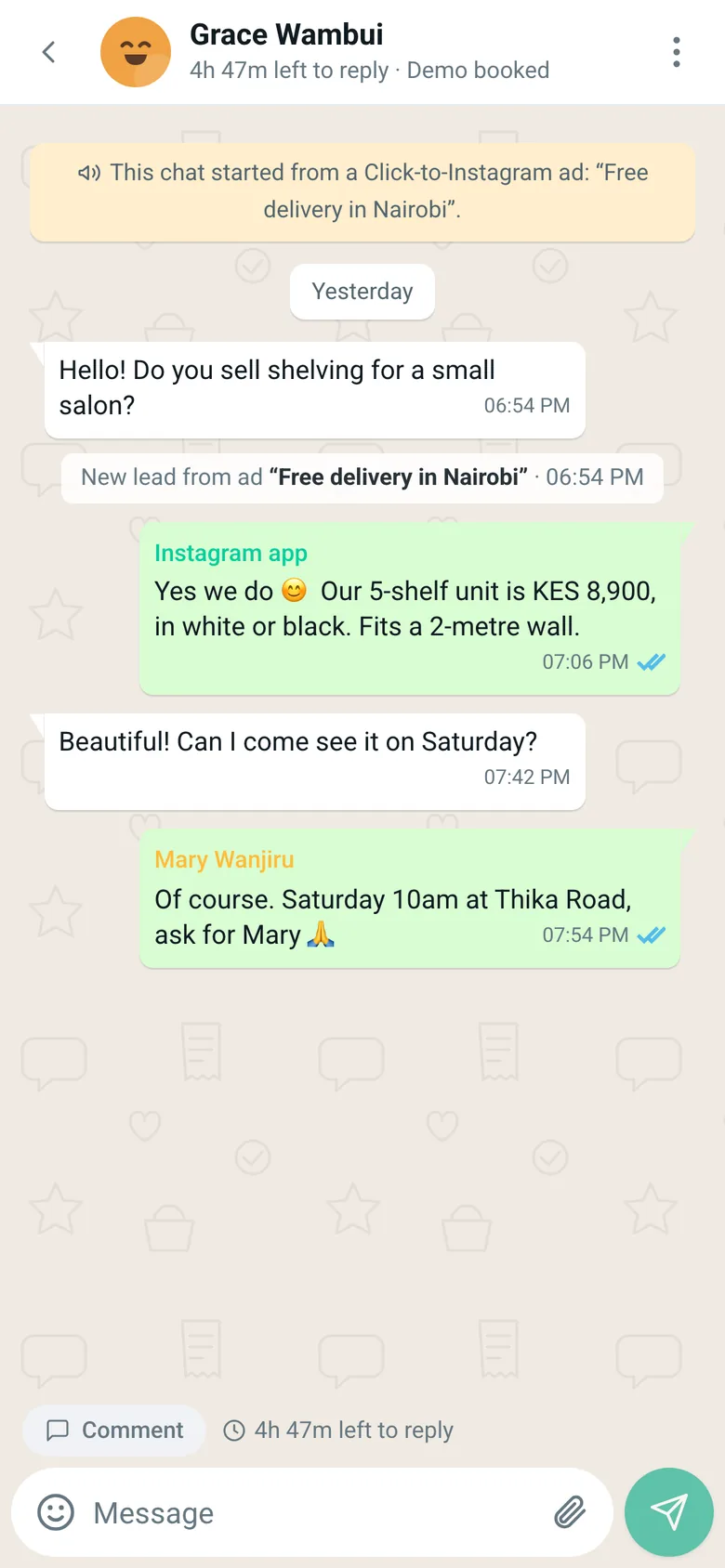
A chat on the phone that started from an Instagram ad, with replies from the Instagram app and from a teammate

Real screen · demo workspace with example data

Sound familiar?

  1. The business phone was in Brian’s pocket all weekend. Monday morning: a pile of unread chats, and two customers who bought elsewhere.

    EliteTeQ Inbox

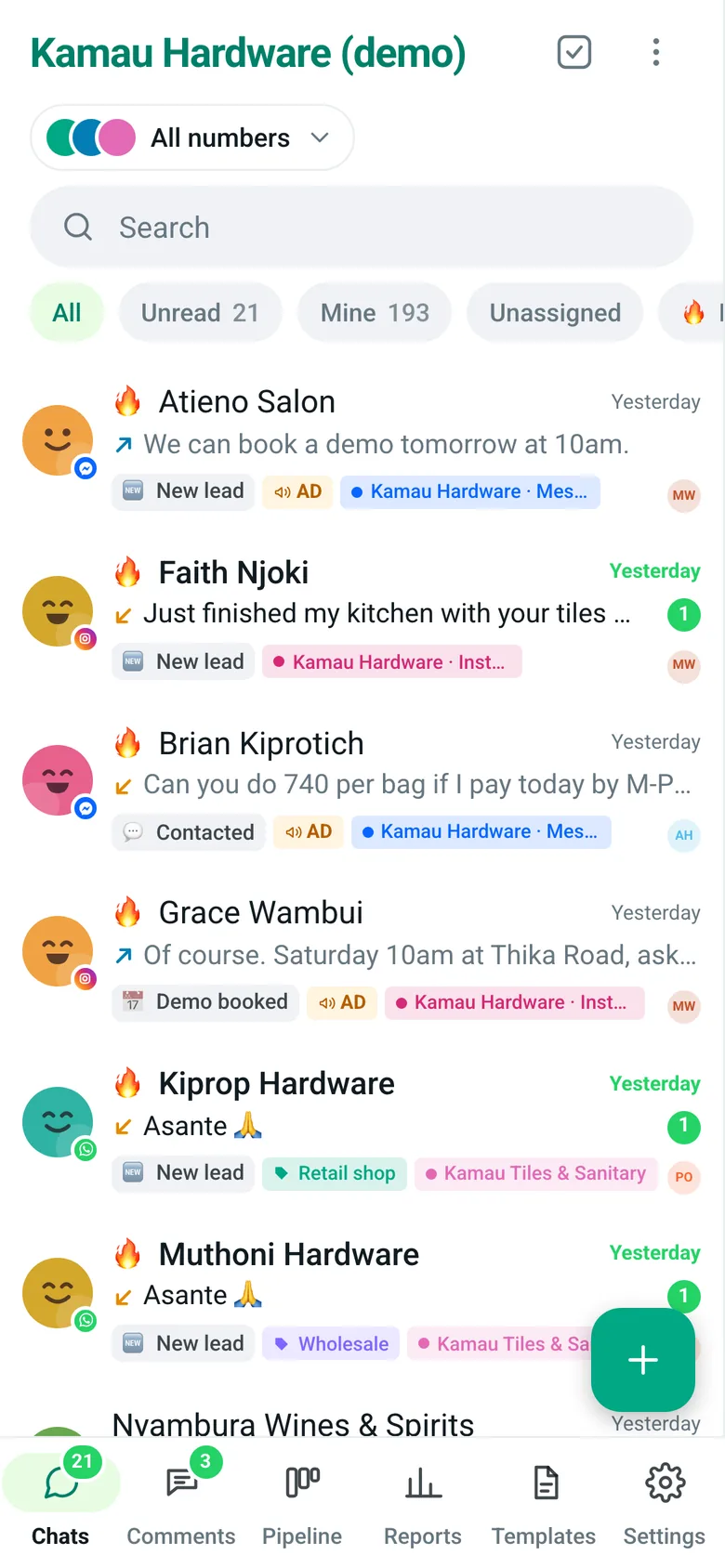
    EliteTeQ Inbox chat list with views for All, Mine, Unassigned and Unread, chat counts per teammate, and customer categories

    Put the number in a shared inbox. Everyone signs in with their own login, on a computer or phone, and the chats still waiting rise to the top.

  2. Two of us answered the same customer with two different prices.

    EliteTeQ Inbox

    An open customer chat in EliteTeQ Inbox showing the ad it came from, an automatic greeting, a staff reply and an internal comment to the owner

    Each chat belongs to one teammate. Notes to each other go in internal comments, inside the chat, and the customer never sees them.

  3. We pay for ads every week, and I can’t tell which ones bring buyers.

    EliteTeQ Inbox

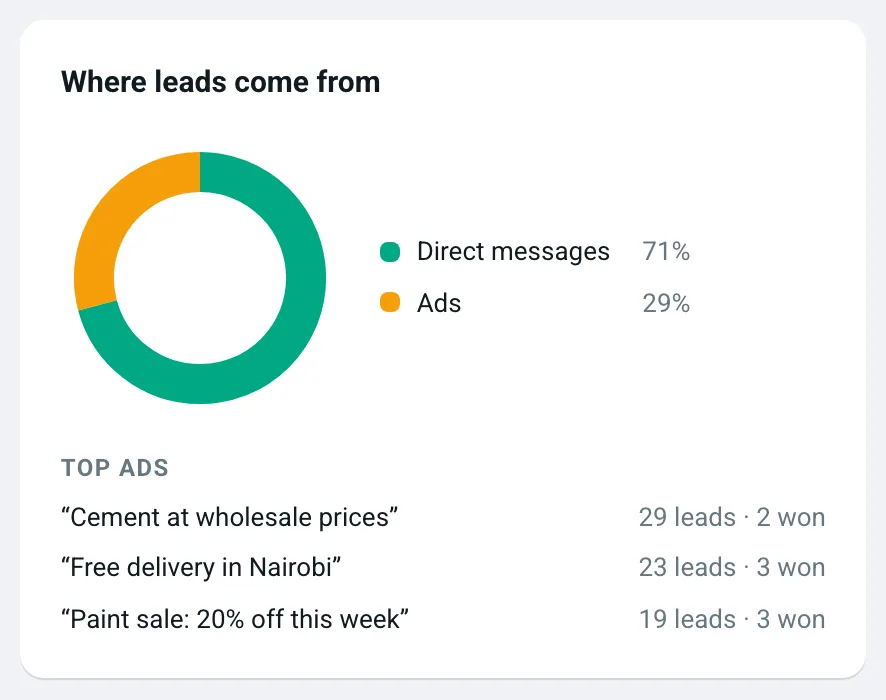
    Report card showing the share of leads from direct messages versus ads, and the top ads ranked by leads and clients won

    Every lead from a Click-to-WhatsApp ad arrives with the ad’s name on it, and the report ranks your ads by leads and by sales.

  4. I don’t know who is close to buying and who went cold.

    EliteTeQ Inbox

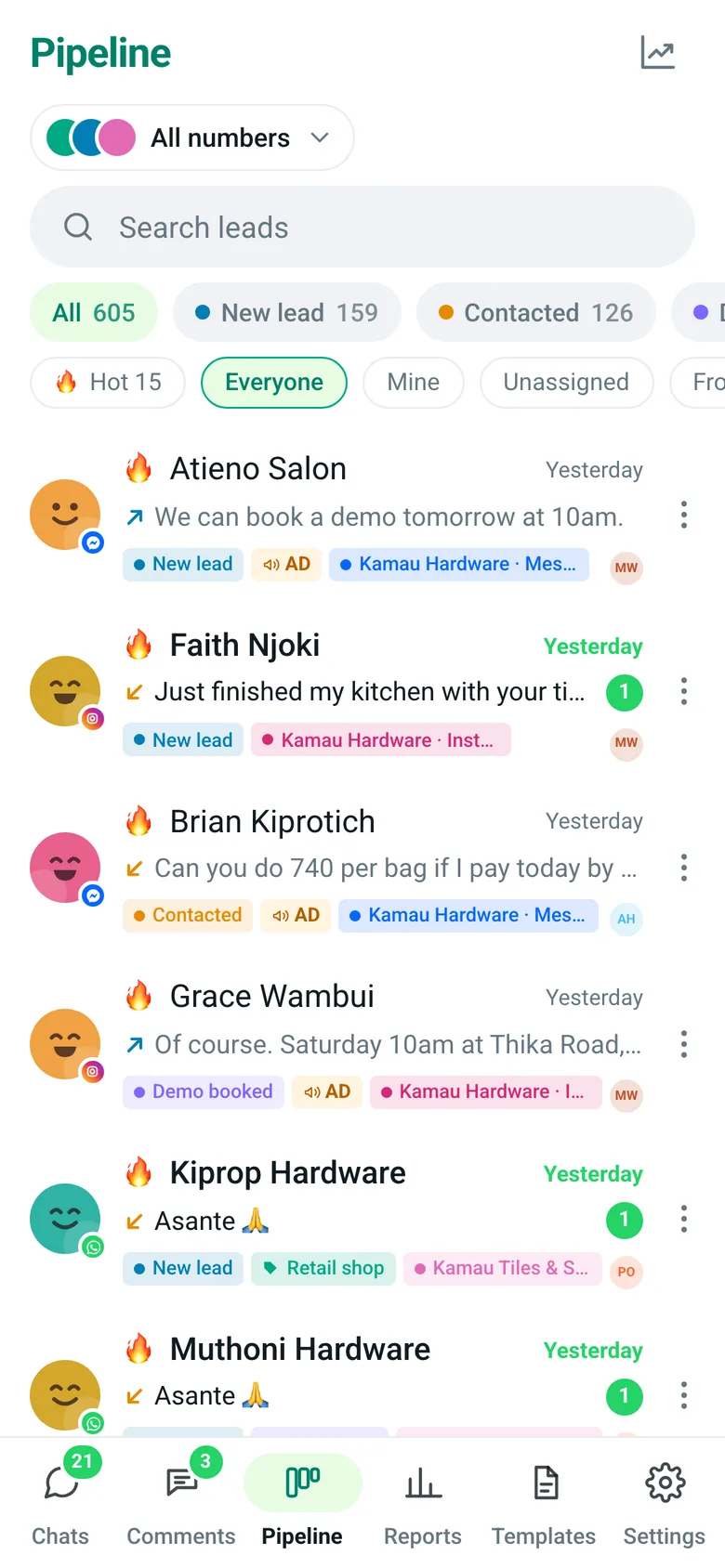
    Pipeline filtered to hot leads, with reasons like New from an ad and Waiting for your reply

    Every customer sits on a pipeline board. The ones waiting for you, fresh from an ad or about to decide are flagged hot.

How many chats are waiting on your business phone right now?

Message us that number. A person replies in under 10 minutes and connects your WhatsApp with you, so your team can start answering today.

What is EliteTeQ Inbox?

EliteTeQ Inbox is a team inbox and CRM for businesses that sell over chat. It connects your WhatsApp Business number, Facebook Page and Instagram account to one shared list where several staff can reply, every customer becomes a lead in a pipeline, and the owner sees who answered, how fast, and which leads are close to buying.

  • One business number, many staff, each with their own login
  • Every chat assigned to one person, with internal comments the customer never sees
  • Leads move through stages from first message to paying customer
  • Reports on reply speed, leads per day, busiest hours and ad sources

EliteTeQ Inbox at a glance

EliteTeQ Inbox at a glance
ProductEliteTeQ Inbox, by EliteTeQ Softwares Limited (Nairobi, Kenya)
What it isA WhatsApp team inbox and CRM
ChannelsWhatsApp Business (official Cloud API, works alongside the WhatsApp Business app), Facebook Messenger, Instagram DMs, Facebook and Instagram comments
Works onAny browser; installs on Android and iPhone
PriceFrom $29 a month; $59 Growth; $99 Business with unlimited people; a year costs 10 months
Free trial7 days, every feature open
WhatsApp numbers1 to 3 included by plan; up to 20 per business (Meta’s limit once the business is verified with Meta)
CountriesAvailable worldwide; local pages for 25 countries in Africa, the Middle East and Asia
SetupAbout 40 minutes, or done with you on WhatsApp
Last reviewed2026-11-01

What your team works with every day

Four screens do most of the work: the inbox, the pipeline, comments and the reports.

The shared inbox

Every WhatsApp, Messenger and Instagram chat in one list, newest first, with the channel, the assignee and how long the customer has waited.

  • Assign or transfer a chat with a handover note
  • Internal comments with @mentions
  • A countdown shows when the 24-hour reply window closes
  • Pin up to 5 chats you’re working on
EliteTeQ Inbox chat list with views for All, Mine, Unassigned and Unread, chat counts per teammate, and customer categories

Real screen · demo workspace with example data

The lead pipeline

Each customer is a card on a board, from new lead to paying client. Drag a card to move it; rename the stages to match how you sell.

  • Stages named after your own sales steps
  • Hot leads flagged automatically
  • Filter by teammate, category or hot leads
  • Insights on how leads move between stages
EliteTeQ Inbox pipeline board with columns from New lead to Client and Lost, each card showing the customer, the last message, hot-lead reasons and the teammate in charge

Real screen · demo workspace with example data

Comments on Facebook and Instagram

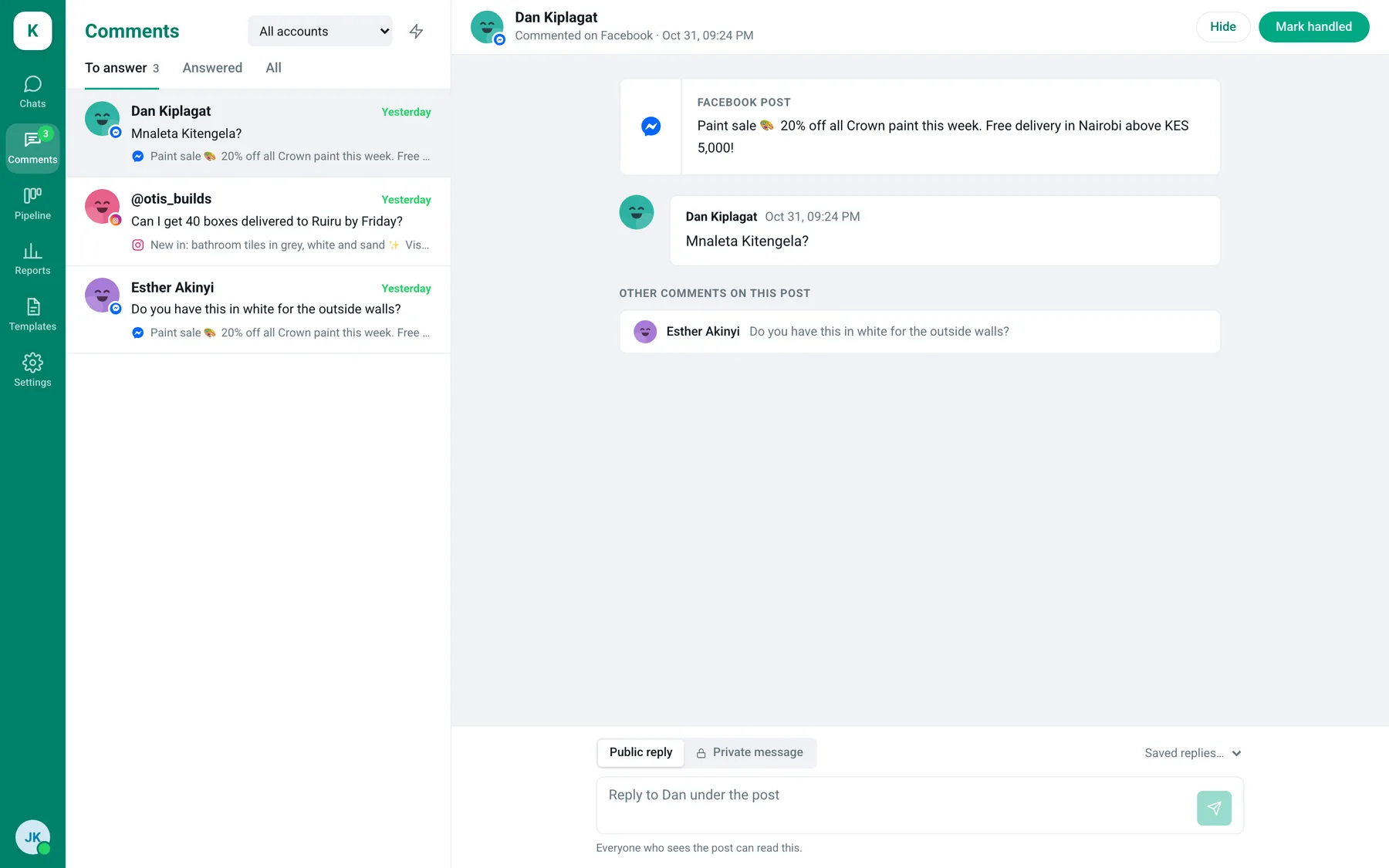
Comments on your posts come in next to your chats, so a “price?” under a post gets answered as quickly as a DM.

  • Reply publicly or privately from one box
  • Automatic replies when a comment contains a keyword
  • Threaded replies, like on Facebook
Comments screen with Facebook and Instagram comments waiting for an answer, the post they belong to, and a public or private reply box

Real screen · demo workspace with example data

Reports the owner can read

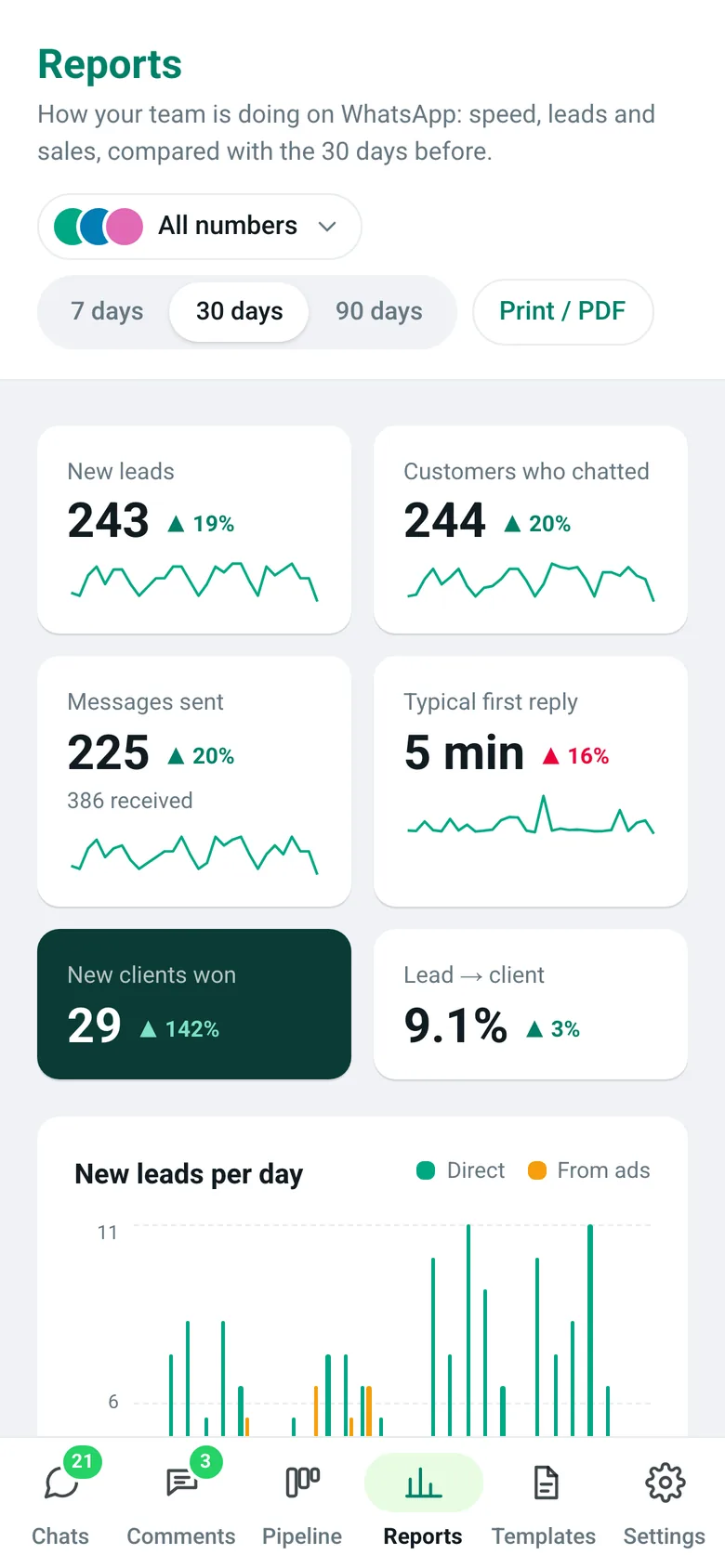
See the week at a glance: leads per day, how fast your team replies, the busiest hours, and which teammate closes the most.

  • Compared with the previous period
  • Leads from ads vs leads that came directly
  • Team leaderboard and waiting list
  • Print or save as PDF
EliteTeQ Inbox reports: new leads, typical first reply time, clients won, leads per day from ads and direct, and the top ads by leads

Real screen · demo workspace with example data

Put my team on one number freeAsk how it works for us

7 days free · no card needed · your whole team

How a team starts on EliteTeQ Inbox

Most businesses are answering from the shared inbox the same day they sign up.

  1. Sign up and add your team

    Create your workspace and add teammates with their own logins. The 7-day trial opens every feature.

  2. Connect your number

    We connect your WhatsApp Business number with you over WhatsApp. It can stay on the WhatsApp Business app on your phone.

  3. Bring in Facebook and Instagram

    Link your Facebook Page and Instagram account so DMs and comments land in the same inbox.

  4. Answer, assign, follow up

    Assign chats, move leads through your pipeline, and see in reports who answered and how fast.

Plans and prices

Prices in US dollars. Paying yearly costs 10 months. Every plan starts with a 7-day free trial with everything open.

Try Growth free for 7 daysNo card needed · you choose the plan when you pay

Build your package: extra people, numbers and onboarding →

One phone for the business vs EliteTeQ Inbox

The difference is that every chat has an owner and nothing depends on one phone.

One phone for the business vs EliteTeQ Inbox
One shared phoneEliteTeQ Inbox
Whoever holds the phone answersEvery teammate answers from their own login
Two people reply to the same customerEach chat is assigned to one person
Chats get lost under newer messagesWaiting chats and hot leads are flagged
No idea who replied, or how fastReply speed and leads per teammate in reports
Facebook and Instagram on other devicesAll channels in the same list

Set up for your country

EliteTeQ Inbox works for any business with a WhatsApp Business number. Your number keeps its +… format, and customers see your business name as they do today.

Each country version of this page covers its own dialling code, time zone and working week, the languages customers write in, and how Meta prices template messages there. Pick yours at the bottom of the page.

Reviewed by the EliteTeQ team ·

Questions businesses ask us

Not answered here? A person from our team replies on WhatsApp.

Ask a real person on WhatsApp
Can I keep using WhatsApp on my phone?

Yes. If your number is on the WhatsApp Business app, it can stay there: messages show on the phone and in the inbox, and replies typed on the phone appear in the inbox marked as sent from the app. Open the app at least every 14 days or Meta disconnects it.

Can I use my personal WhatsApp number?

No. Move it to the free WhatsApp Business app first. It keeps the same number and your chats.

Will my old WhatsApp chats show up?

When you connect a WhatsApp Business app number, Meta offers to share your recent chat history once, roughly the last 6 months. If you agree, those chats are added to the inbox. Older chats stay on your phone.

How long does setup take?

About 40 minutes the first time. Most businesses let us do it with them on WhatsApp, and paid setup packages are available if you want contacts, pipeline and templates done for you too.

How much does it cost?

Starter is $29 a month for 1 WhatsApp number and 3 people, Growth $59 for 2 numbers and 6 people, and Business $99 for 3 numbers and unlimited people. Paying yearly costs 10 months. Every plan starts with a 7-day free trial.

Do we pay WhatsApp for messages?

Replies inside 24 hours of a customer’s message are free. Meta charges for template messages you start, at its rate for the customer’s country, billed to your Meta account and not part of the EliteTeQ price.

Can we send a broadcast to everyone?

Not yet. You send approved templates to people one by one, and only to customers who agreed to hear from you. Mass messages to people who didn’t ask get numbers reported and limited.

WhatsApp rules on this page, from Meta:WhatsApp Business Platform pricing (Meta)Messaging limits (Meta)Message templates (Meta)Business phone numbers and limits (Meta)About the WhatsApp Business Platform (Meta)
Give every customer chat an owner

Start the 7-day free trial, or message us and we’ll connect your number with you.

Put my team on one number free

7 days free · no card needed · your whole team

Or WhatsApp us on +1 214 423 5355

To: EliteTeQ · +1 214 423 5355

Hi EliteTeQ! I’d like to connect our business WhatsApp number so my whole team can answer from EliteTeQ Inbox.

WhatsAppIndustries