No customer waits for the phoneShared WhatsApp inbox
Your team answers customers from one business number, each from their own login, without stepping on each other’s replies.
WhatsApp on one phone works until two people need to answer at once, or the person holding it goes home. EliteTeQ Inbox moves your business number into a shared inbox that works on any computer or phone, and gives every chat a clear owner.
Customers message at nine at night and nobody answers until morning.
EliteTeQ Inbox
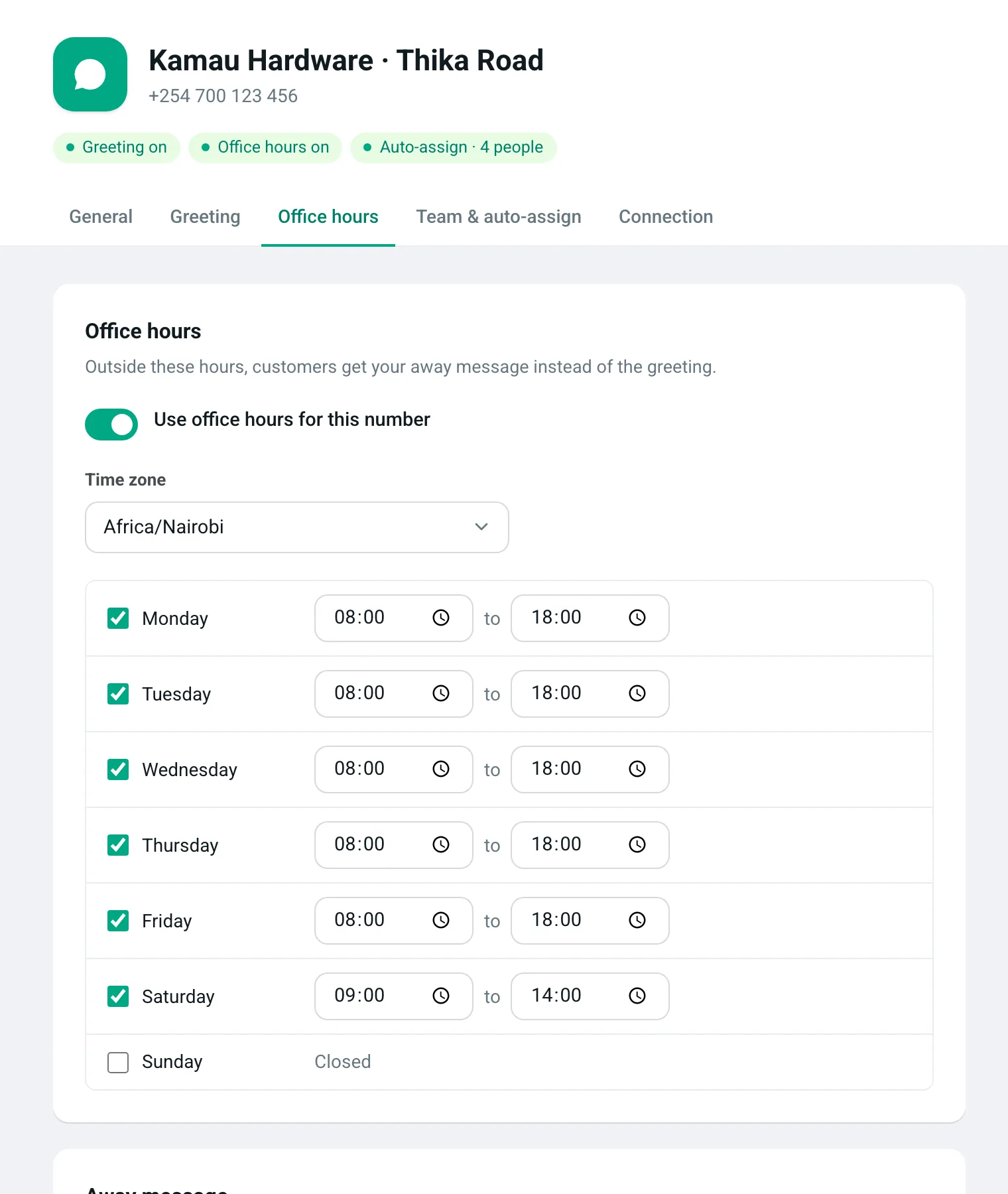
Set office hours for each number, in your time zone. After hours, customers get your away message straight away, and their chat waits at the top of the list for the morning.
Amaka ends up answering every chat, because the phone lives at the till.
EliteTeQ Inbox
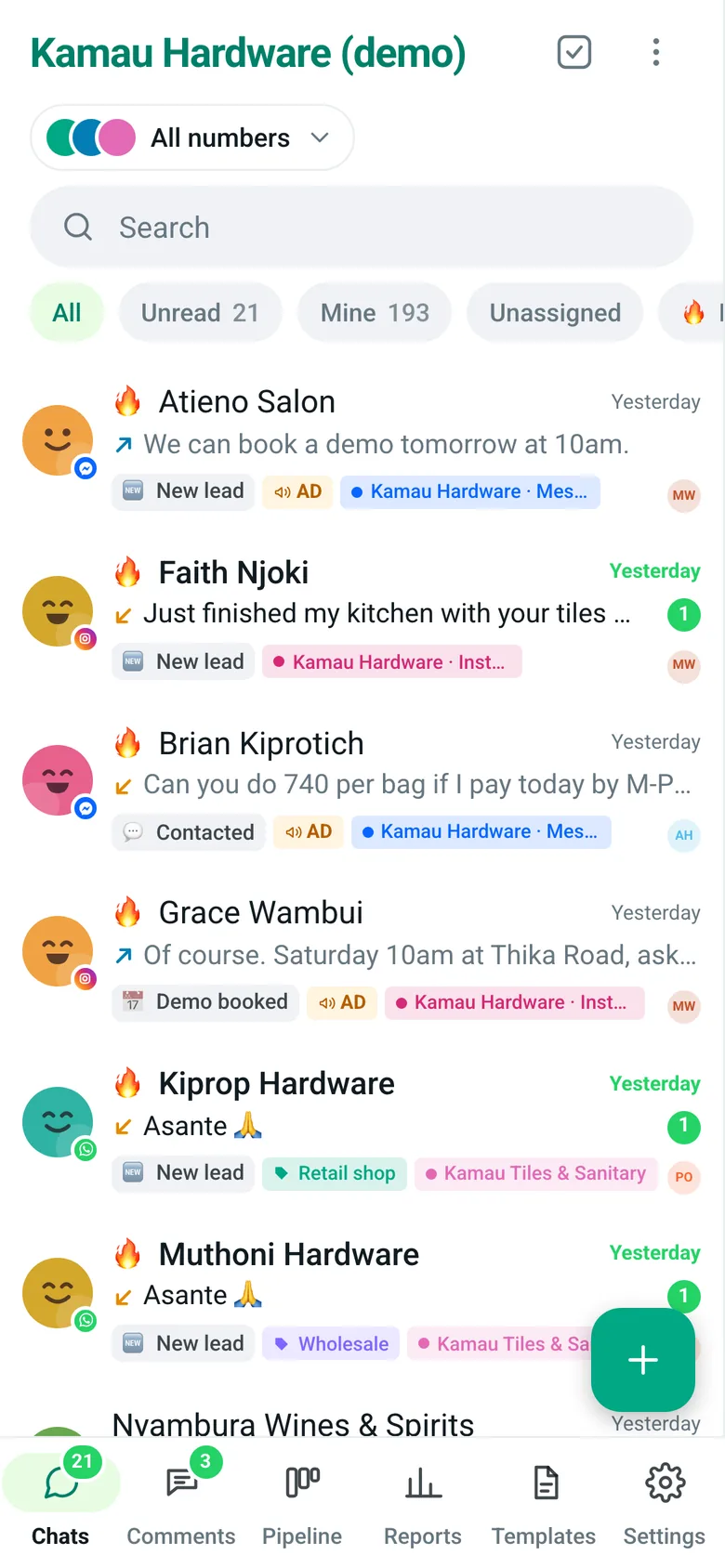
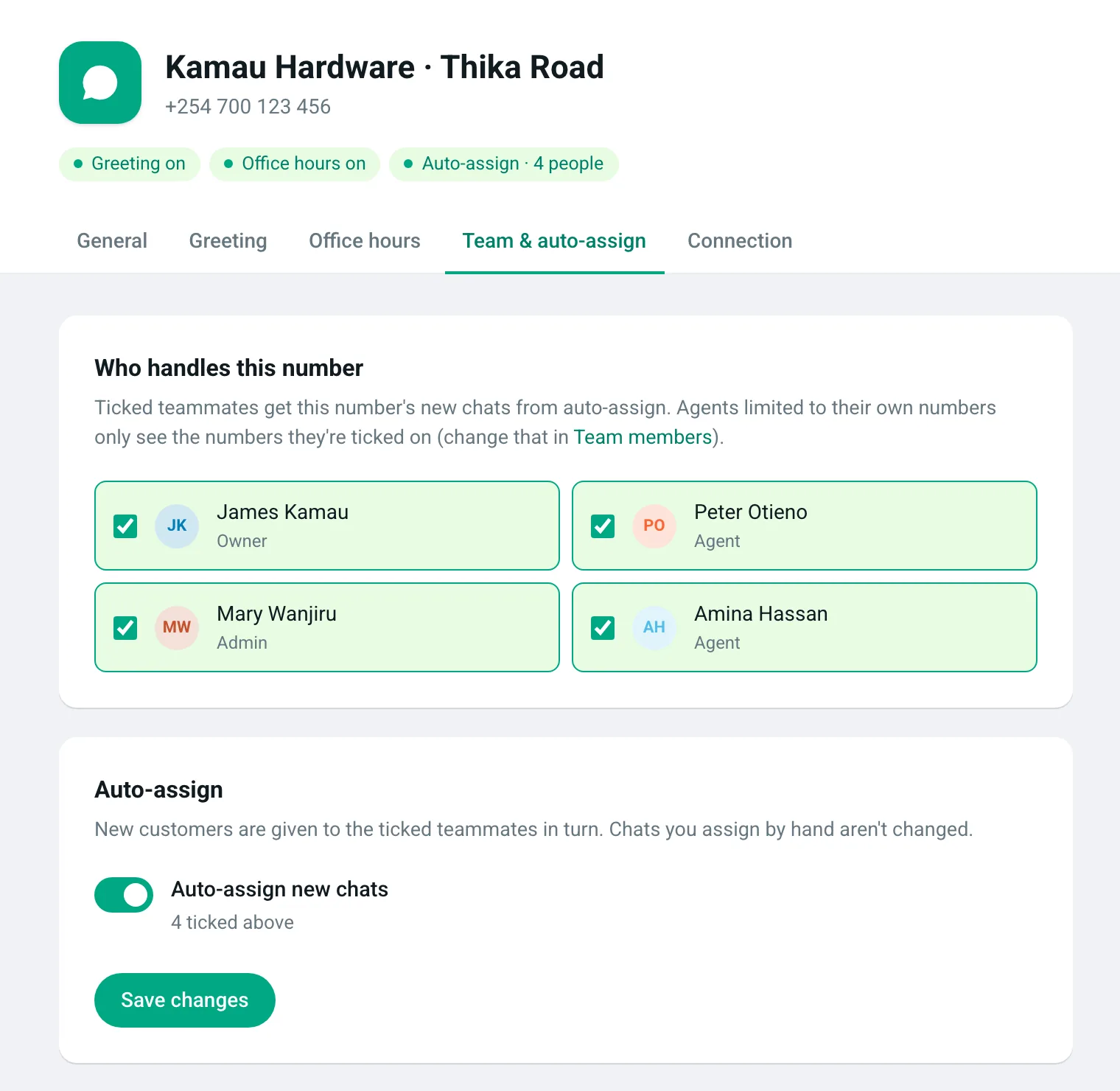
Tick who handles the number and turn on auto-assign. Each new customer goes to the next person in turn.
The 24 hours passed and now WhatsApp won’t let us reply.
EliteTeQ Inbox
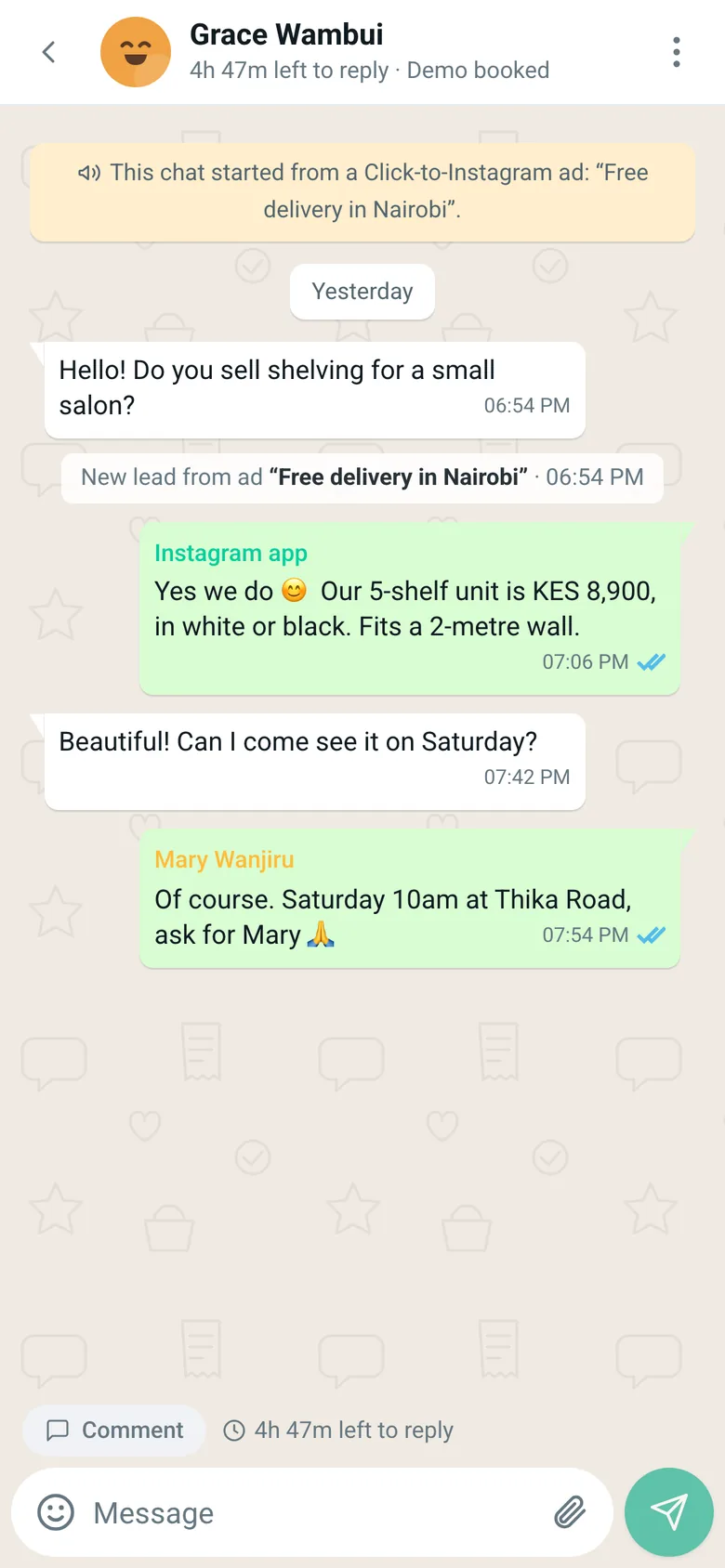
Every chat shows how long you have left to reply. When the window closes, send an approved template from the same box.
Who answers your customers when the phone holder goes home?
Tell us how many people should answer. We set up logins, auto-assign and office hours with you on WhatsApp, usually in one sitting.
A shared WhatsApp inbox lets several staff answer customers from one WhatsApp Business number at the same time, each from their own login. EliteTeQ Inbox does this on the official WhatsApp Business Platform: chats are assigned to one teammate, internal comments stay inside the team, and the owner sees every conversation.
One number, many logins, on computer or phone
Each chat assigned to one teammate
Internal comments the customer never sees
Owners and admins see every chat
EliteTeQ Inbox at a glance
EliteTeQ Inbox at a glance
Product
EliteTeQ Inbox, by EliteTeQ Softwares Limited (Nairobi, Kenya)
What it is
A WhatsApp team inbox and CRM
Channels
WhatsApp Business (official Cloud API, works alongside the WhatsApp Business app), Facebook Messenger, Instagram DMs, Facebook and Instagram comments
Works on
Any browser; installs on Android and iPhone
Price
From $29 a month; $59 Growth; $99 Business with unlimited people; a year costs 10 months
Free trial
7 days, every feature open
WhatsApp numbers
1 to 3 included by plan; up to 20 per business (Meta’s limit once the business is verified with Meta)
Countries
Available worldwide; local pages for 25 countries in Africa, the Middle East and Asia
Setup
About 40 minutes, or done with you on WhatsApp
Last reviewed
2026-11-01
What a shared inbox fixes
The everyday problems of one business phone, one at a time.
Every chat has an owner
Assign a chat by hand, or turn on auto-assign so each new customer goes to the next teammate in turn. Transfer a chat with a handover note and the new owner gets an alert.
Round-robin auto-assign per number
Transfers with handover notes
Two people can still reply if they need to
Bulk-assign many chats at once
crm.eliteteqpos.com
Real screen · demo workspace with example data
Greeting, away message and office hours
New customers get a greeting during office hours. Anyone who writes while you’re closed gets an away message, at most once every 12 hours. Hours run in your own time zone.
Set each day separately, including overnight shifts
A different greeting and hours for each number
Late messages never trigger an old auto-reply
crm.eliteteqpos.com
Real screen · demo workspace with example data
Templates for when the window closes
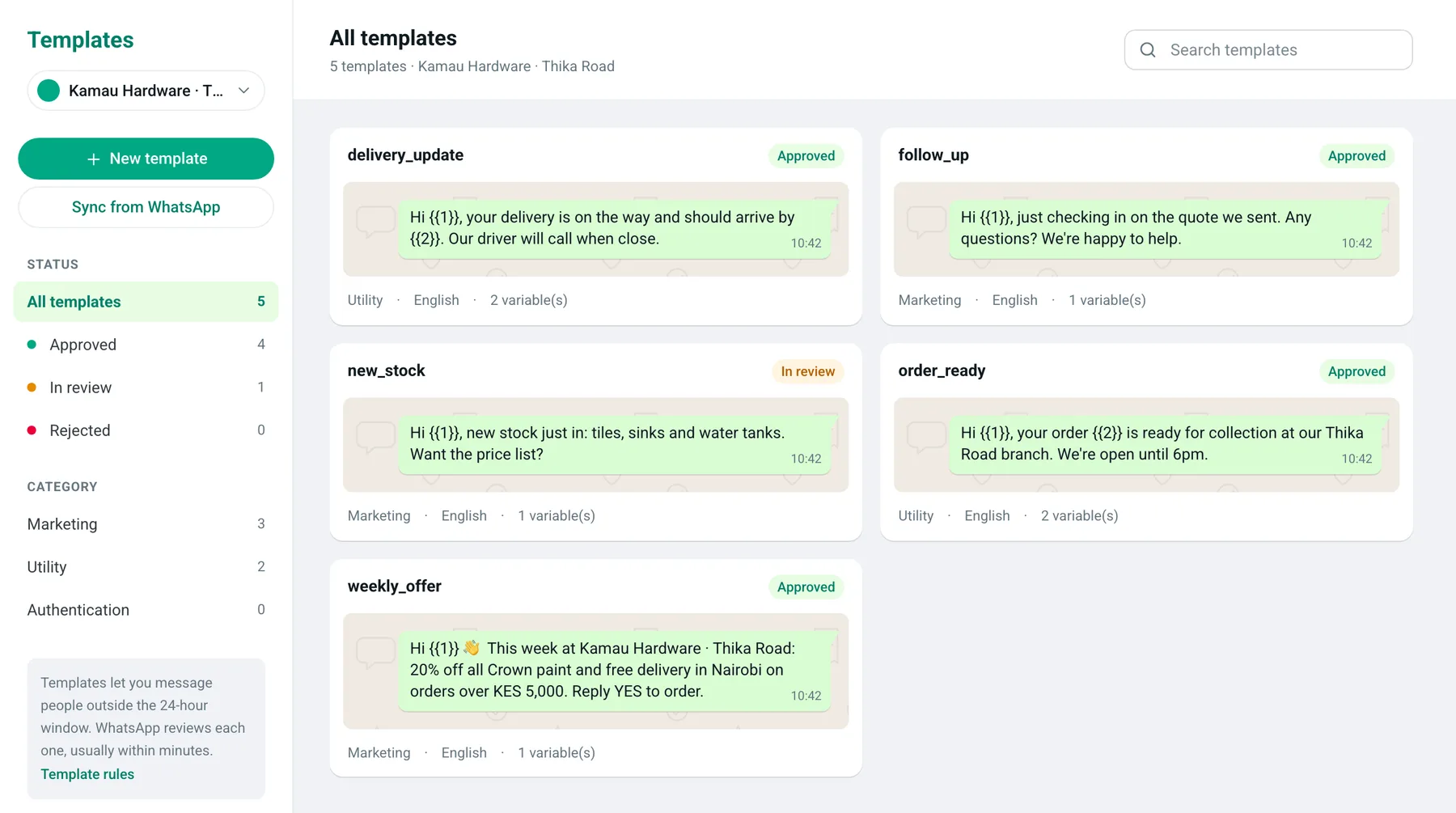
WhatsApp lets you reply freely for 24 hours after a customer writes. After that, or to message someone new, you send a template approved by WhatsApp. Create and track them in the app.
Live preview while you write
Status: in review, approved or rejected, with the reason
Languages: English, French or Swahili
crm.eliteteqpos.com
Real screen · demo workspace with example data
On the phone too
Install EliteTeQ Inbox on Android or iPhone from the browser. It looks and works like WhatsApp, with sounds, pop-ups and an unread badge.
7 days free · no card needed · keep the WhatsApp Business app
How a shared WhatsApp inbox works
Customers message the same number they always have; your team answers from the inbox.
A customer writes
Amaka messages your business number. The chat appears in the inbox for everyone allowed to see that number.
It goes to one person
Auto-assign gives new chats to the next teammate in turn, or anyone can take it. The chat shows whose it is.
The team works on it together
The owner leaves an internal comment, “@Brian offer free delivery”, that the customer never sees.
Nothing is left waiting
Waiting chats rise to the top, and a countdown shows how long you have before WhatsApp’s 24-hour reply window closes.
WhatsApp Business app alone vs with EliteTeQ Inbox
You can keep the app; the inbox adds the team.
WhatsApp Business app alone vs with EliteTeQ Inbox
WhatsApp Business app alone
With EliteTeQ Inbox
One phone, plus a few linked devices
Every teammate on their own login
No way to say who handles a chat
Assign, transfer and auto-assign
Notes to staff go in another chat
Internal comments inside the chat
No record of who replied, or how fast
Reply speed per teammate in reports
Each number on its own phone
Several numbers in one inbox (Business plan)
Set up for your country
Customers keep messaging the same number; only the way your team answers changes.
Each country version of this page covers its own dialling code, time zone and working week, the languages customers write in, and how Meta prices template messages there. Pick yours at the bottom of the page.
Reviewed by the EliteTeQ team ·
Questions businesses ask us
Not answered here? A person from our team replies on WhatsApp.
Yes, and both replies are sent. To avoid double answers, assign the chat to one person.
Can a teammate be limited to one number?
Yes. Agents can be limited to certain numbers. Owners and admins always see everything.
What’s the difference between the greeting and the away message?
The greeting goes once to new customers during office hours. The away message goes to anyone who writes while you’re closed, at most once every 12 hours. Both are set per number.
Why can’t we type a reply to some customers?
It has been more than 24 hours since the customer last wrote. WhatsApp only allows an approved template until they reply again.
How many new people can we message each day?
New businesses can start conversations with 250 people a day. Meta raises it to 1,000, 10,000 and beyond after business verification and good-quality messaging. Replies to people who wrote first don’t count.
Do customers see internal comments?
Never. Comments are only for your team. Type @ and a name to mention a teammate.