Let your systems talk on WhatsAppWhatsApp API for developers
Your POS, online shop or app sends the WhatsApp message; your team sees it, and every reply, in EliteTeQ Inbox.
The EliteTeQ API connects your own software to the WhatsApp Business number in your inbox. Send order updates and receipts with approved templates, add leads from your website, and get a webhook the moment a customer writes back. There is no Meta developer app to set up yourself: the number is already connected in EliteTeQ Inbox.
201 Created
{ "object": "message", "status": "sent" }
Real screen · demo workspace with example data
Where WhatsApp still needs a person typing
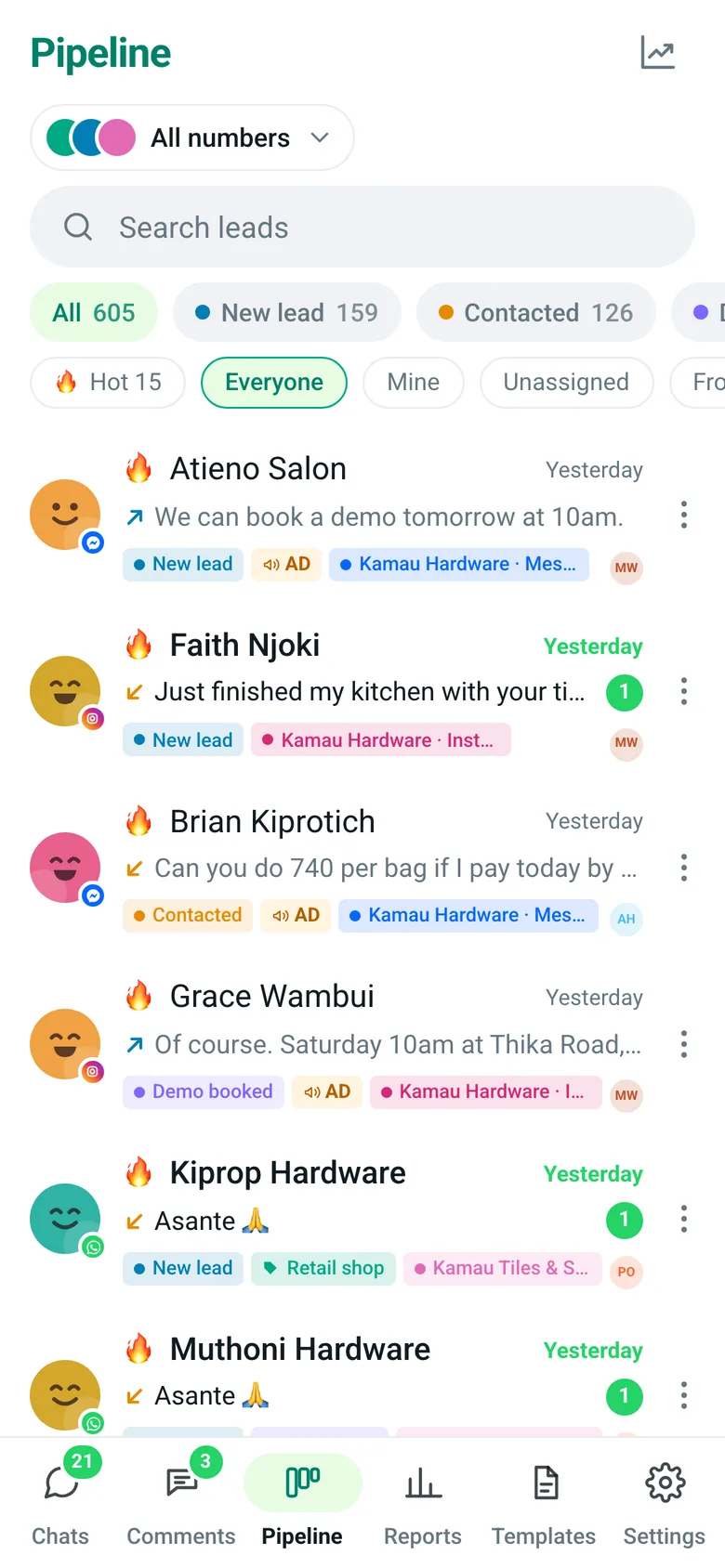
Our POS knows when an order is ready, but someone still types the WhatsApp message.
EliteTeQ Inbox
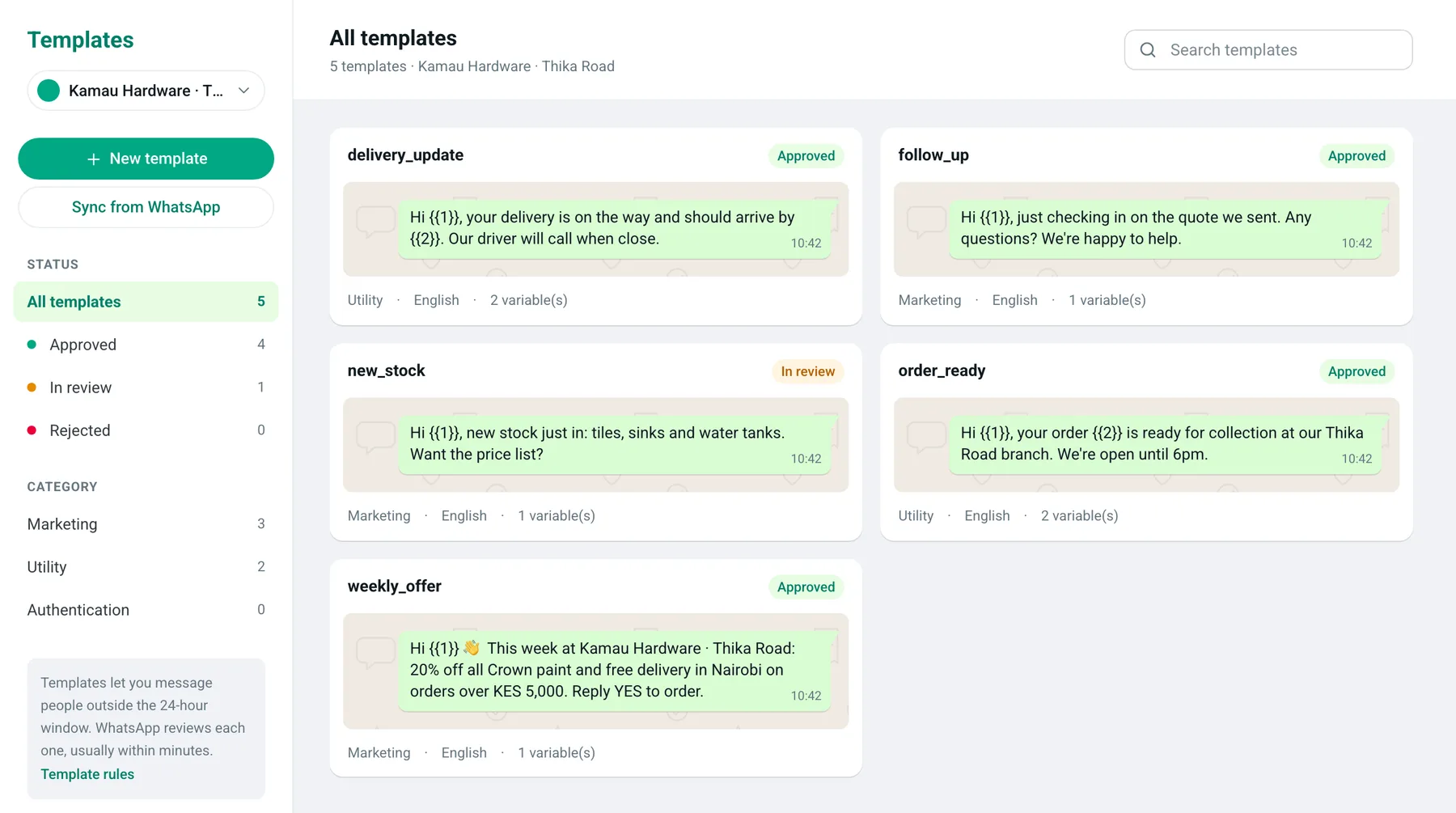
Your POS calls the API with an approved template, such as order_ready, and the customer gets it at once. The message and any reply show in the inbox for your team.
Leads from our website form never reach the WhatsApp team.
EliteTeQ Inbox
Add each lead with the API. It lands on the pipeline in the first stage, with its source, ready for a teammate to message.
Our system has no idea what customers say on WhatsApp.
EliteTeQ Inbox
Subscribe to the message.received webhook. Every customer message is posted to your system, signed so you know it came from EliteTeQ, and retried if your server is down.
What should your system say on WhatsApp first?
Tell us what you want to connect: a POS, an online shop or your own app. We switch on API access and help you send your first template.
The EliteTeQ API lets your own software use the WhatsApp Business number connected to EliteTeQ Inbox. With an API key you can add and update contacts, move them through pipeline stages, send text messages or approved WhatsApp templates, read message history, and receive signed webhooks when customers write, read or reply. Plans start with a free sandbox; API Starter is $29 a month for 50,000 requests.
Contacts, groups, stages and messages over REST
WhatsApp, Messenger and Instagram from one API
8 webhook events, signed and retried
Keys limited to the permissions you choose
EliteTeQ Inbox at a glance
EliteTeQ Inbox at a glance
Product
EliteTeQ Inbox, by EliteTeQ Softwares Limited (Nairobi, Kenya)
What it is
A WhatsApp team inbox and CRM
Channels
WhatsApp Business (official Cloud API, works alongside the WhatsApp Business app), Facebook Messenger, Instagram DMs, Facebook and Instagram comments
Works on
Any browser; installs on Android and iPhone
Price
From $29 a month; $59 Growth; $99 Business with unlimited people; a year costs 10 months
Free trial
7 days, every feature open
WhatsApp numbers
1 to 3 included by plan; up to 20 per business (Meta’s limit once the business is verified with Meta)
Countries
Available worldwide; local pages for 25 countries in Africa, the Middle East and Asia
Setup
About 40 minutes, or done with you on WhatsApp
Last reviewed
2026-11-01
What you can build
The same inbox your team uses, reachable from your code.
Send messages from your system
Send a text inside the 24-hour window, or an approved template any time: order ready, payment received, delivery on the way. The answer tells you if it was sent, is waiting, or failed and why.
Text or approved templates with parameters
Delivery and read updates arrive as webhooks
Messages show in the inbox next to your team’s replies
crm.eliteteqpos.com
Real screen · demo workspace with example data
Keep contacts and the pipeline in sync
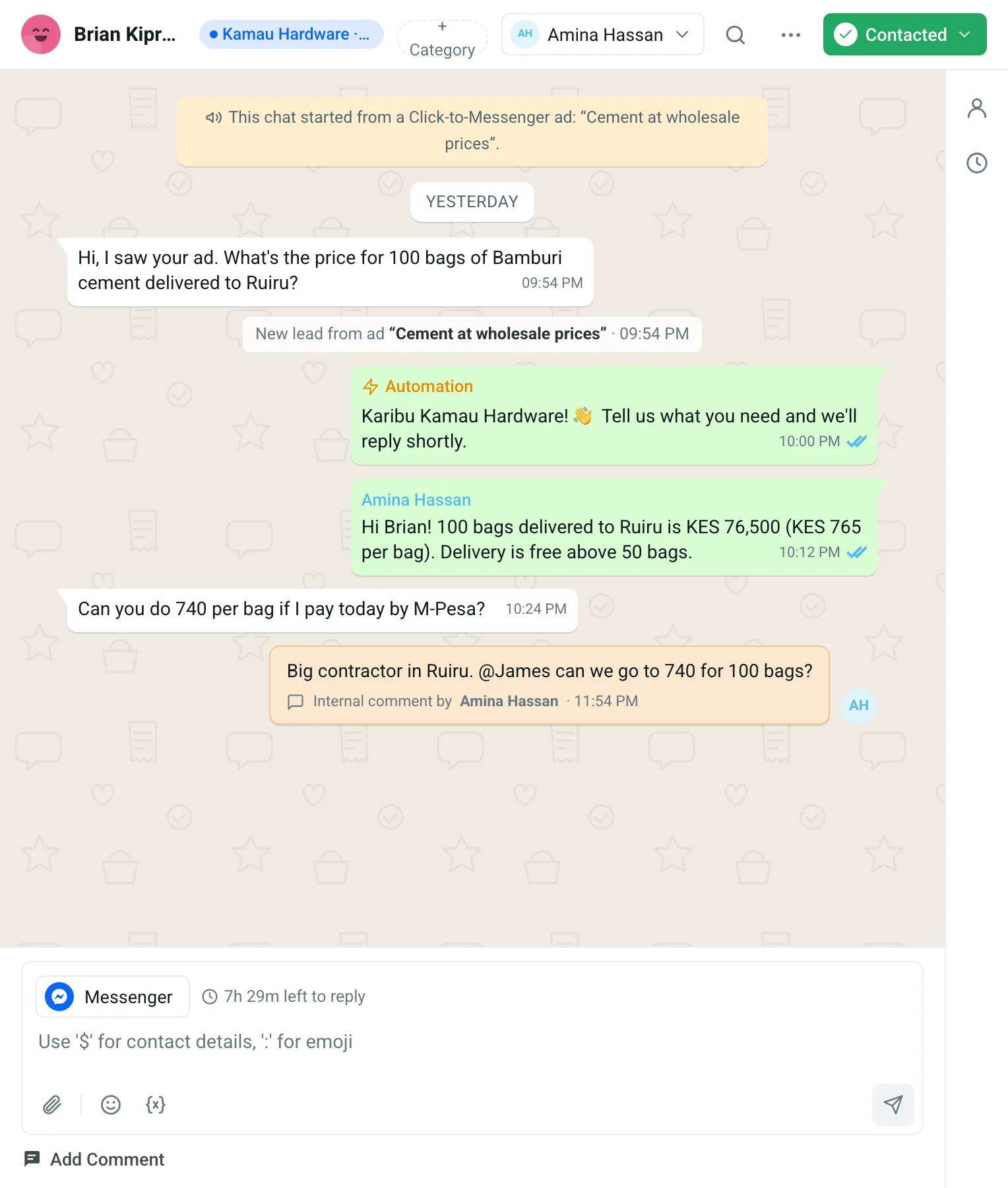
Create and update contacts, set their stage, category and tags, or update many at once. Your CRM, shop or website and the inbox stay the same.
Create, search and update contacts
Move leads between stages
Batch updates and groups
crm.eliteteqpos.com
Real screen · demo workspace with example data
Hear about every conversation
Webhooks post to your server when a contact is created or updated, a chat is assigned, or a message is received, sent, delivered, read or fails.
Free sandbox · test keys never send · API in early access
How to start with the API
The API is in early access: message us and we switch it on for your account.
Create a test key
In Settings → Developers, create an et_test_ key with only the permissions you need. Test keys check everything but never save or send.
Build against the docs
Use the API reference with its built-in console, the OpenAPI file or the Postman collection.
Switch to a live key
Swap in an et_live_ key. Messages now go to real customers from your connected WhatsApp number.
Watch usage and webhooks
See every request with its ID, and test or resend webhooks, in Settings → Developers.
API plans
US dollars a month, on top of any EliteTeQ Inbox plan. The Business plan already includes 10,000 requests a month.
EliteTeQ API plans
Plan
Monthly fee
API requests a month
Good for
Developer Sandbox
Free
1,000
Build and test with test keys that check everything but never save or send.
API Starter
$29
50,000
One integration: your POS, shop or website sending order and receipt messages.
API Growth
$99
250,000
Several systems connected, or a busy store syncing contacts all day.
API Business
$299
1 million
High volume across branches, apps and back-office systems.
Enterprise API
Custom
Negotiated
Custom volume, limits and support, agreed with you.
Every call to the API is one request; webhooks we send you are free. Meta’s charges for WhatsApp template messages are separate. Ask about Enterprise API
Typing it by hand vs the API
The message is the same; nobody has to remember to send it.
Typing it by hand vs the API
By hand
With the EliteTeQ API
Someone copies the order number into WhatsApp
Your system sends the template the moment the order is ready
Website leads sit in an email inbox
Each lead lands on the pipeline at once
No record of WhatsApp in your own system
Every message arrives by webhook
One shared login for the integration
Separate keys, each with only the permissions it needs
Set up for your country
The API sends from your connected WhatsApp Business number, so customers see your business name as usual. Meta’s charges for template messages are billed to your Meta account, separately from API requests.
Each country version of this page covers its own dialling code, time zone and working week, the languages customers write in, and how Meta prices template messages there. Pick yours at the bottom of the page.
Reviewed by the EliteTeQ team ·
Questions businesses ask us
Not answered here? A person from our team replies on WhatsApp.
Every call your system makes to the API counts as one request, whether it reads or sends. Webhooks EliteTeQ sends to you don’t count, and Meta’s charges for WhatsApp template messages are separate.
Is this Meta’s WhatsApp API?
No. It is EliteTeQ’s API on top of the official WhatsApp Business Platform. Your number is connected once in EliteTeQ Inbox, so you don’t need your own Meta developer app, and messages sent through the API appear in the inbox for your team.
Do we need an EliteTeQ Inbox plan?
Yes. The API works on an active EliteTeQ Inbox account, and API plans are added on top. The Business plan includes 10,000 requests a month.
Is there a free sandbox?
Yes. Test keys check every request exactly like live keys but never save or send anything, with up to 1,000 requests a month.
How fast can we call it?
Each key allows 120 requests a minute. Above that, the API answers with a rate-limit error and the number of seconds to wait.
Can we message any customer from the API?
A free-form text needs the customer to have written in the last 24 hours on WhatsApp (7 days on Messenger and Instagram). Otherwise send an approved template, and only to customers who agreed to hear from you.
Is the API available now?
It is in early access. Message us on WhatsApp and we switch it on for your EliteTeQ Inbox account.