WhatsApp CRM

Know who’s about to buyWhatsApp CRM and sales pipeline in Bahrain

Every person who messages you becomes a lead on a board, so you can see who is close to buying and who needs a follow-up.

Most chat-based businesses track leads in their heads, or not at all. EliteTeQ Inbox puts each customer on a pipeline from first message to paying client, flags the ones worth answering first, and shows where leads stall. Contacts keep their +973 codes, and hot leads are judged on Manama time (AST).

7 days free · no card needed · your chats become leads automatically

WhatsApp or call +1 214 423 5355 · a person replies, usually in under 10 minutes

  • Pipeline board with stages you name
  • Hot leads flagged automatically
  • Import contacts from your phone or a spreadsheet
  • Reports on leads, sources and the team
EliteTeQ Inbox pipeline board with columns from New lead to Client and Lost, each card showing the customer, the last message, hot-lead reasons and the teammate in charge
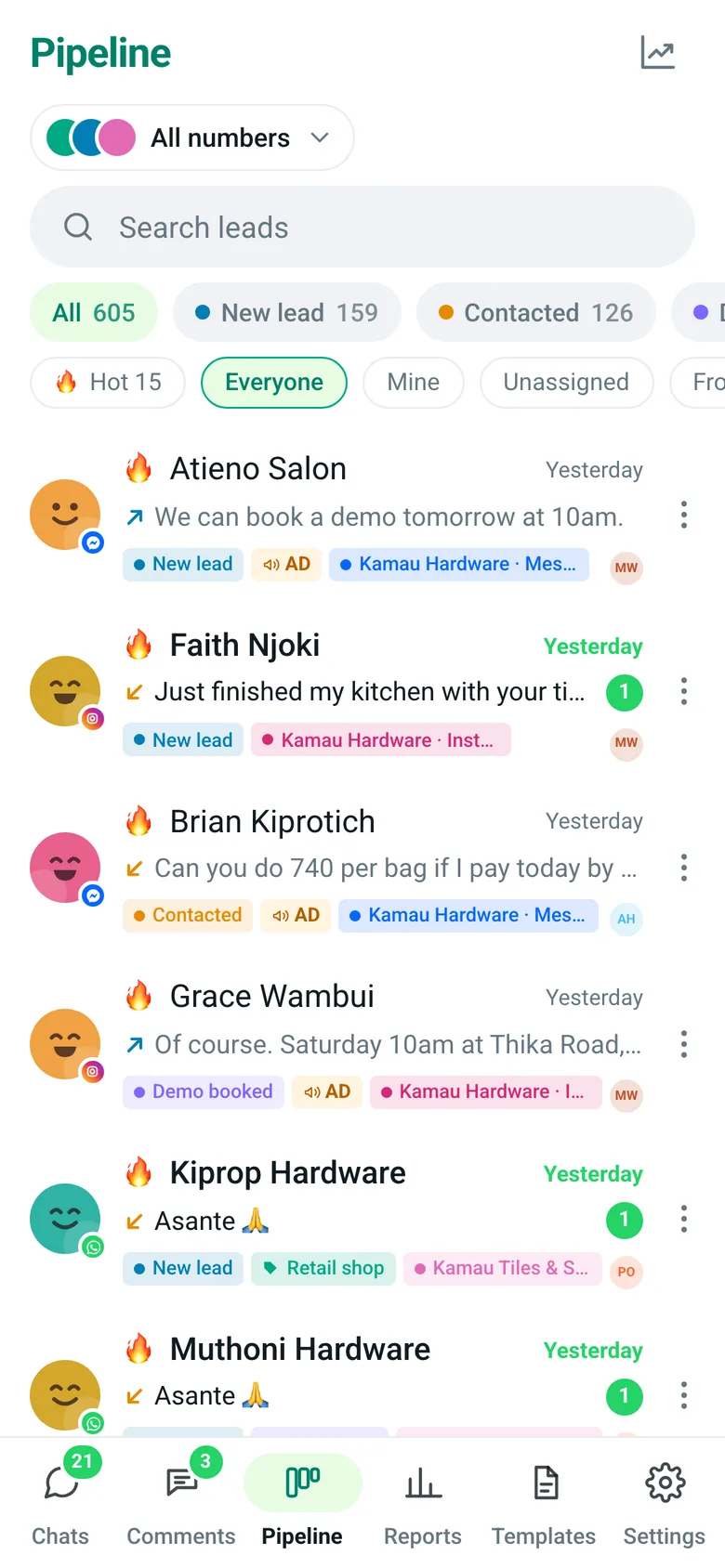
The pipeline on a phone, as a list with stage filters and hot leads first

Real screen · demo workspace with example data

Where WhatsApp sales slip away

  1. My leads live in my head and a notebook by the till.

    EliteTeQ Inbox

    EliteTeQ Inbox pipeline board with columns from New lead to Client and Lost, each card showing the customer, the last message, hot-lead reasons and the teammate in charge

    Every person who messages you becomes a card on a board, from new lead to paying client, without anyone copying it in.

  2. I keep forgetting to follow up on the quotes we sent.

    EliteTeQ Inbox

    Pipeline filtered to hot leads, with reasons like New from an ad and Waiting for your reply

    Leads waiting for your reply, fresh from an ad or active at a deciding stage are flagged hot and sorted first.

  3. Our sales don’t go “demo, trial”. We quote, deliver, then get paid.

    EliteTeQ Inbox

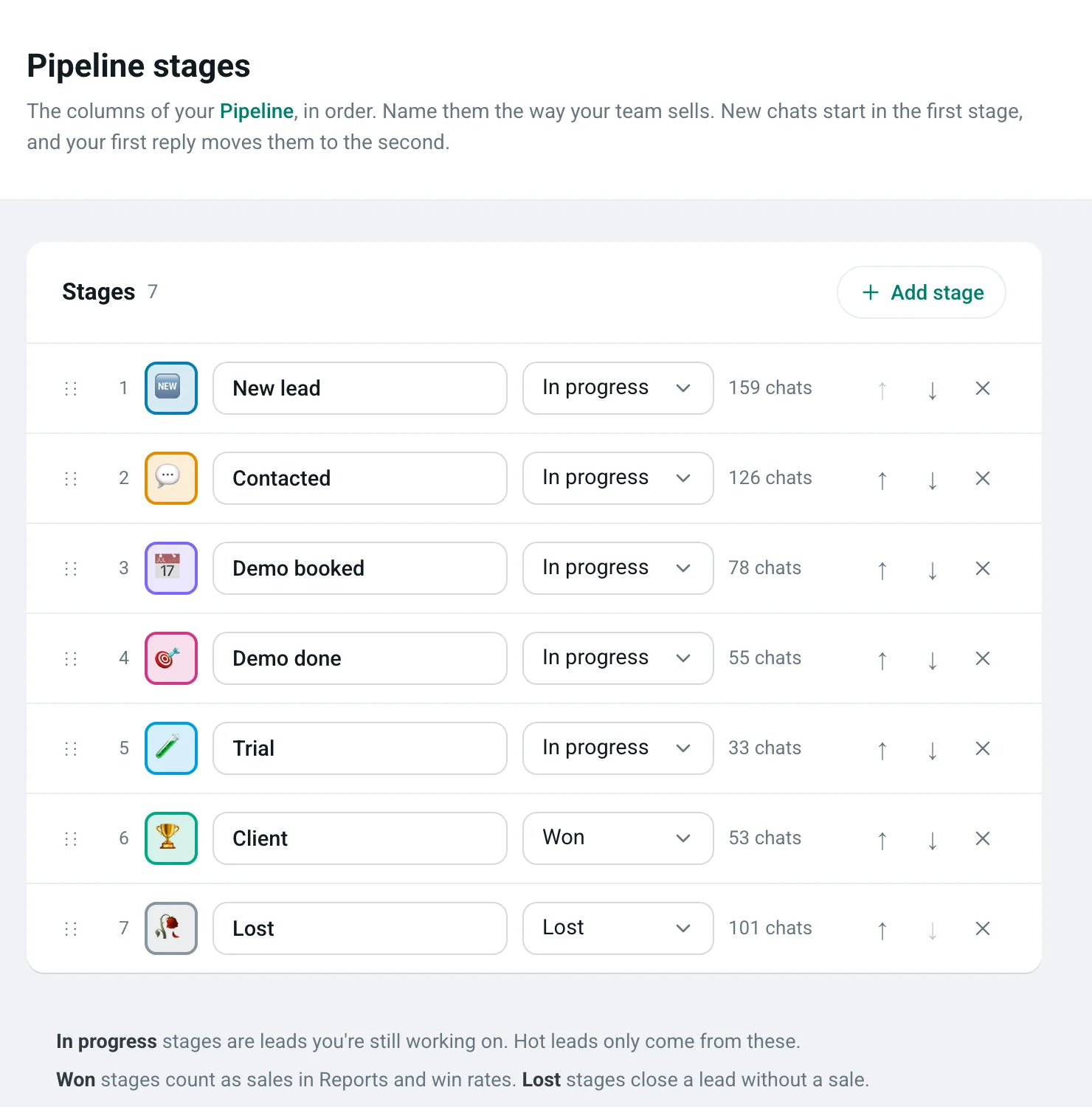
    Pipeline stages settings: each stage has an icon, a name you choose and a type (in progress, won or lost), with buttons to add, reorder and remove stages

    Then name the stages that way. Add, rename and reorder them, give each an icon, and mark which ones mean won or lost.

  4. I can’t see which of my staff actually sells.

    EliteTeQ Inbox

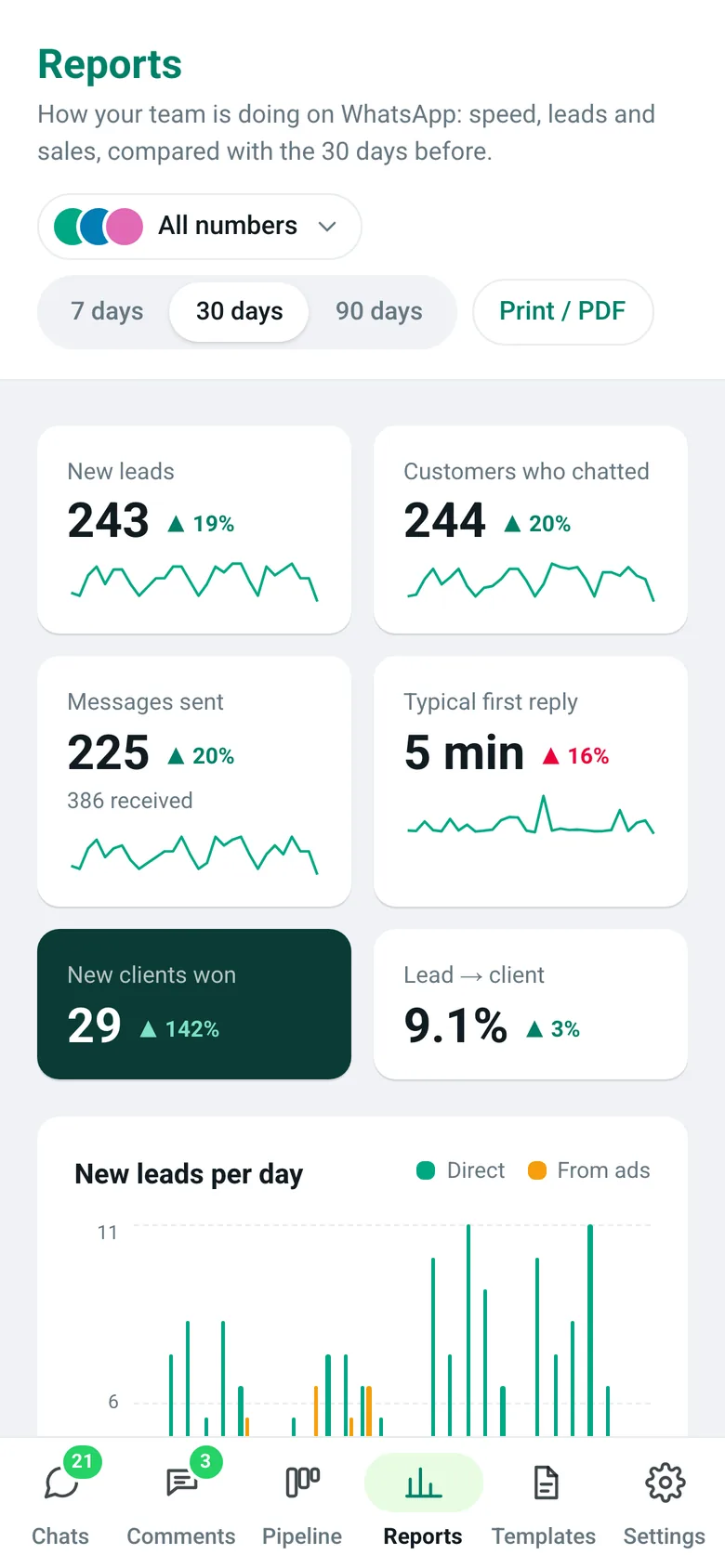
    Reports showing how fast customers get a first reply, messages per day, the busiest hours of the week and the sales funnel

    Reports show reply speed, the busiest hours of the week, the funnel by stage and who closes the most.

Which of today’s WhatsApp chats will buy this week?

Tell us how you sell, from first message to payment. We’ll suggest the pipeline stages for your business and set them up with you.

What is a WhatsApp CRM?

A WhatsApp CRM keeps a record of every customer who messages your business on WhatsApp and tracks them from first enquiry to sale. In EliteTeQ Inbox, each chat is a lead on a pipeline board, with its full message history, notes, category, owner and source, so your team in Bahrain knows exactly who to follow up and why.

  • Every chat linked to one lead
  • Stages you can rename, add and reorder
  • Hot leads flagged by rules and by the team
  • History of every stage change and transfer

EliteTeQ Inbox at a glance

EliteTeQ Inbox at a glance
ProductEliteTeQ Inbox, by EliteTeQ Softwares Limited (Nairobi, Kenya)
What it isA WhatsApp team inbox and CRM
ChannelsWhatsApp Business (official Cloud API, works alongside the WhatsApp Business app), Facebook Messenger, Instagram DMs, Facebook and Instagram comments
Works onAny browser; installs on Android and iPhone
PriceFrom $29 a month; $59 Growth; $99 Business with unlimited people; a year costs 10 months
Free trial7 days, every feature open
WhatsApp numbers1 to 3 included by plan; up to 20 per business (Meta’s limit once the business is verified with Meta)
In Bahrain+973 WhatsApp Business numbers, office hours on Manama time (AST)
LanguagesCustomers write in Arabic and English
SetupAbout 40 minutes, or done with you on WhatsApp
Last reviewed2026-11-01

What the CRM side gives you

A pipeline that stays up to date because it lives where the conversations happen.

A pipeline in your own words

Start with stages like New lead, Contacted, Demo booked, Trial, Client and Lost, then rename them to match how you sell. Empty stages hide until you drag a card.

  • Custom stages per workspace
  • Won and lost stages count separately
  • Group and filter the board
  • A list view on phones with stage chips
EliteTeQ Inbox pipeline board with columns from New lead to Client and Lost, each card showing the customer, the last message, hot-lead reasons and the teammate in charge

Real screen · demo workspace with example data

Stages that follow how you sell

Your pipeline is set up in Settings → Pipeline stages. Name each column after a real step in your business, pick an icon, put them in order, and say which ones mean a sale was won or lost.

  • Add, rename, reorder and remove stages
  • Each stage is in progress, won or lost
  • Won stages count as sales in Reports and win rates
  • New chats start in the first stage; your first reply moves them to the second
Pipeline stages settings: each stage has an icon, a name you choose and a type (in progress, won or lost), with buttons to add, reorder and remove stages
  1. Name it your way
  2. Pick an icon
  3. In progress, won or lost
  4. Add, reorder or remove

Real screen · demo workspace with example data

Hot leads, first

A lead is hot when the customer is waiting for your reply, arrived from an ad in the last 72 hours, or is active at a deciding stage. Your team can mark any lead hot too.

  • 🔥 badge in Chats and Pipeline
  • Hot filter and hot-first sorting
  • Closed leads never show as hot
Pipeline filtered to hot leads, with reasons like New from an ad and Waiting for your reply

Real screen · demo workspace with example data

Your contacts, already in

Import the contacts on your phone (.vcf) or a spreadsheet (.csv from Google Contacts or Excel). Each person becomes a lead; when they next write, the chat joins their card.

  • Any country’s numbers
  • No duplicates when you import again
  • Categories you define, assigned in bulk
The pipeline on a phone, as a list with stage filters and hot leads first

Real screen · demo workspace with example data

Reports on what sells

Leads per day, how fast you reply, a funnel by stage, a team leaderboard, the busiest hours of the week, and which ads bring leads.

  • Compared with the previous period
  • Waiting list of unanswered leads
  • Print or save as PDF
Reports showing how fast customers get a first reply, messages per day, the busiest hours of the week and the sales funnel

Real screen · demo workspace with example data

Your process, your stages

No two businesses in Bahrain sell the same way. Pick yours to see a pipeline you could set up in a few minutes.

Big orders are quoted first, delivered later and paid on delivery, so each step gets its own column.

  1. EnquiryIn progress
  2. Quote sentIn progress
  3. Delivery bookedIn progress
  4. PaidWon
  5. LostLost

More for this trade: Hardware & building materials →

Examples you can set up yourself in Settings → Pipeline stages, not fixed templates.

Start my pipeline freeAsk how to set up my stages

7 days free · no card needed · your chats become leads automatically

How a WhatsApp lead moves to a sale

The pipeline fills itself from your chats; your team moves the cards.

  1. A new chat becomes a lead

    When Fatema first messages you, a card appears in the first stage with their name, number and where they came from.

  2. It gets flagged if it’s hot

    Leads waiting for a reply, fresh from an ad, or active at a deciding stage are marked 🔥 and sorted first.

  3. Your team moves it along

    Drag the card from stage to stage as the conversation progresses. Every move is logged on the lead.

  4. You see what closes

    Pipeline insights and reports show how many leads reach each stage and who on the team closes them.

A notebook or spreadsheet vs a WhatsApp CRM

A list kept by hand is out of date the moment the next message arrives, whether it comes from Manama or Muharraq or from overseas.

A notebook or spreadsheet vs a WhatsApp CRM
Notebook or spreadsheetEliteTeQ Inbox CRM
Copied in by hand, when someone remembersEvery new chat becomes a lead by itself
No idea who is close to buyingHot leads flagged and sorted first
Follow-ups depend on memoryWaiting list shows who hasn’t had a reply
Can’t tell which ad brought a customerAd source saved on the lead
Lost when a staff member leavesFull history stays with the business

EliteTeQ Inbox in Bahrain

Contacts import with their country codes intact, so +973 numbers and overseas customers sit in the same pipeline.

In Bahrain, customers message shops and services on WhatsApp, including from across the causeway. EliteTeQ Inbox shows the team every open chat and who owns it.

Customers in Bahrain write in Arabic, English or both. Your team replies in the customer’s language inside the 24-hour window; template messages can currently be created in English.

The working week in Bahrain runs Sunday to Thursday, and office hours are set day by day, so Friday can be closed and Saturday short or closed. Customers who write on the weekend get your away message, at most once every 12 hours, and their chats wait at the top of the list for Sunday morning.

Selling on WhatsApp in Bahrain

Customers in Bahrain pay with BenefitPay, cards, contactless, and Apple Pay, so when a sale closes on WhatsApp the customer may confirm payment in the chat, and your team needs to see that message quickly.

Muharraq

Muharraq Governorate · a historic city adjoining the international airport

A dense traditional urban core sits next to the airport, giving established local retail and transit-linked hospitality. Businesses are smaller and owner-run compared with Manama's malls. The binding constraint is correct invoicing without mall-scale overhead. Buyers in Muharraq who ask for a price and go quiet stay on the pipeline until someone follows up.

Riffa

Southern Governorate · a large residential city

One of the largest residential areas, where neighbourhood supermarkets and family dining dominate over destination shopping, with steady evening and weekend demand. Riffa is one of Bahrain's largest residential areas, where neighbourhood retail, supermarkets and family dining dominate rather than destination shopping. Buyers in Riffa who ask for a price and go quiet stay on the pipeline until someone follows up.

Isa Town

Northern Governorate · a planned residential and education town

A planned residential area with a substantial education presence, producing term-time swings alongside steady neighbourhood retail and market trade. Isa Town is a planned residential area with a substantial education presence, producing term-time demand swings alongside steady neighbourhood retail and market trade. Buyers in Isa Town who ask for a price and go quiet stay on the pipeline until someone follows up.

EliteTeQ Inbox in every city of Bahrain

  • ManamaCapital Governorate · Bahrain's capital and financial centre
  • MuharraqMuharraq Governorate · a historic city adjoining the international airport
  • RiffaSouthern Governorate · a large residential city
  • Isa TownNorthern Governorate · a planned residential and education town
  • Hamad TownNorthern Governorate · a residential town in Bahrain's Northern Governorate

Reviewed by the EliteTeQ team ·

Questions businesses ask us

Not answered here? A person from our team replies on WhatsApp.

Ask a real person on WhatsApp
Can I bring in the contacts from my phone?

Yes. Import a .vcf file exported from your phone or a .csv from Google Contacts or Excel. Names and numbers come in, not old messages: WhatsApp doesn’t let other apps read chats from your phone.

Can we change the pipeline stages?

Yes. Rename, add, reorder and colour stages for your workspace, and mark which ones count as won or lost.

What makes a lead “hot”?

The customer is waiting for your reply (within 24 hours), the lead came from an ad in the last 72 hours, or it’s active at a deciding stage. Your team can also mark any lead hot by hand.

Can we sort customers into groups?

Yes. Create categories in Settings, assign them in a chat or to many leads at once, and filter Chats and Pipeline by category.

Can we message a lead who hasn’t written to us?

Yes, with a template approved by WhatsApp, and only if they agreed to hear from you. Free-form replies are possible for 24 hours after they write.

Can we import our customers’ Bahraini phone numbers?

Yes. Import a .vcf file from your phone or a .csv from Google Contacts or Excel. Numbers keep their country codes, so +973 numbers and overseas customers sit in the same pipeline, and importing again never makes duplicates.

What pipeline stages should a business in Bahrain use?

Use the steps your customers actually go through. A hardware shop might use Enquiry, Quote sent, Delivery booked, Paid; a salon Enquiry, Booked, Came in, Regular. Stages are added, renamed and reordered in Settings, and each is marked in progress, won or lost.

WhatsApp rules on this page, from Meta:WhatsApp Business Platform pricing (Meta)Messaging limits (Meta)Message templates (Meta)Business phone numbers and limits (Meta)About the WhatsApp Business Platform (Meta)
See every lead you’re talking to in Bahrain

Start the 7-day free trial and your pipeline fills from the first chat.

Start my pipeline free

7 days free · no card needed · your chats become leads automatically

Or WhatsApp us on +1 214 423 5355

To: EliteTeQ · +1 214 423 5355

Hi EliteTeQ! I want to track our WhatsApp leads in a pipeline. Can you help me set up stages for how we sell? I’m in Bahrain.

WhatsAppIndustries